Live series · With Lara Shackelford

    Build Your AI Chief of Staff.

    For directors and senior directors. You carry the most, and the role rarely comes with a chief of staff.

    Session 1 · Kickoff

    Day One: Put Your Chief of Staff to Work

    Wednesday, December 2
    10 a.m.–1 p.m. Pacific / 1–4 p.m. Eastern

    Then six sessions through January 12.

    Pick your date

    See every session. What to bring.

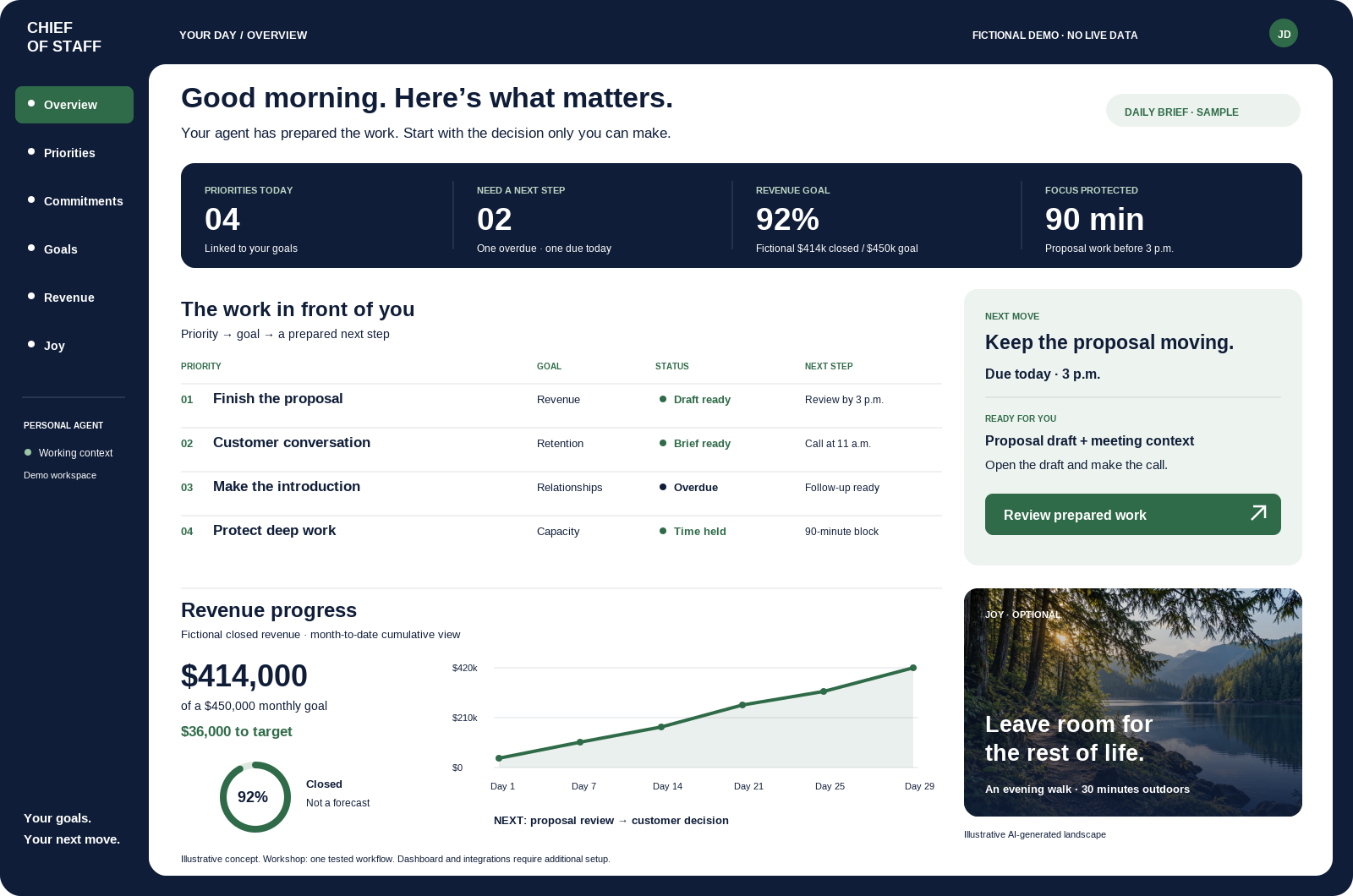
    Example Chief of Staff dashboard with priorities, goal progress and time allocation. Fictional data.A dashboard example, shown with fictional data.

    Live series · With Lara Shackelford

    Build Your AI Chief of Staff

    Everyone above you has a chief of staff. Build yours.

    For directors and senior directors. You carry the most, and the role rarely comes with a chief of staff. Build in Claude or ChatGPT, live with Lara. Start with one kickoff. Each session after it adds one working piece. By January, your Chief of Staff runs your week with you.

    Kickoff
    $295
    Three hours.
    Any later session
    $150
    90 minutes each. Add them one at a time.
    Full series
    $695
    One kickoff plus all six sessions. $695 through Nov. 30, then $895. Bought one at a time, the series is $1,195.
    Get the full series · $695 through Nov. 30

    Kickoff: Wednesday, December 2

    1. Session 1 · Kickoff

      Day One: Put Your Chief of Staff to Work

      The kickoff: set up your AI Chief of Staff and your dashboard.

      Wednesday, December 2, 2026 · 1–4 p.m. Eastern / 10 a.m.–1 p.m. Pacific

      Three hours. You leave with a Chief of Staff that knows your priorities and has finished its first task. Every later session builds on what you set up here.

      • Set up your Chief of Staff in your own Claude or ChatGPT account, around your role and your priorities.
      • Build a dashboard you can edit, with a chart.
      • Test it on one task you do by hand today.

      You leave with: Your Chief of Staff and a first dashboard, tested on a task from your own week.

    2. Session 2

      Hand Off the Holidays

      Build your out-of-office handoff and your holiday plan.

      Saturday, December 5, 2026 · Noon–1:30 p.m. Eastern / 9–10:30 a.m. Pacific

      Coverage at work and plans at home, so you are no longer the only person who knows the plan. Take the time off. Your Chief of Staff holds the plan while you are away.

      • Write a handoff for your time away: who covers what, until when, and what is still open.
      • Keep the family plans in one place, separate from work.
      • Catch missing or out-of-date details before anything goes out.

      You leave with: A holiday handoff for work and a plan for home, each checked for gaps.

    3. Session 3

      Stop Briefing It From Scratch

      Give your Chief of Staff a memory: your second brain.

      Tuesday, December 8, 2026 · 1–2:30 p.m. Eastern / 10–11:30 a.m. Pacific

      Give your Chief of Staff a memory, so it knows what you told it last week. Most people re-explain their work to AI every morning. This session ends that.

      • Set up a capture routine for notes, decisions and documents, using sources you approve.
      • Ask a question and get the answer with where it came from.
      • Decide what it should never keep.

      You leave with: A capture and retrieval routine running on sources you approve.

    4. Session 4

      Monday, Already Handled

      Build your weekly review and your handoffs.

      Thursday, December 10, 2026 · Noon–1:30 p.m. Eastern / 9–10:30 a.m. Pacific

      A weekly review your Chief of Staff prepares before you sit down. You start the week knowing what matters, without assembling it yourself.

      • Build a weekly review of your commitments, your deadlines and what slipped.
      • Set up handoffs for work that moves to someone else.
      • Change a priority midweek and check that your system keeps up.

      You leave with: A weekly review your system runs, tested against a change in priorities.

    5. Session 5

      Give Your Chief of Staff a Staff

      Add a team of agents with clear lanes and approval rules.

      Monday, December 14, 2026 · 1–2:30 p.m. Eastern / 10–11:30 a.m. Pacific

      One assistant becomes a small team, and each member has one job. A single assistant can only do so much. A team with clear lanes and approval rules does more, and you stay in charge.

      • Split the work into lanes, such as inbox, meetings and research.
      • Set what each agent may do alone and what needs your approval.
      • Run one piece of work through the team from start to finish.

      You leave with: A small agent team with clear lanes and approval rules.

    6. Session 6

      What Does a 10 Look Like?

      Score your year and set your rules for saying yes and saying no.

      Thursday, December 17, 2026 · 1–2:30 p.m. Eastern / 10–11:30 a.m. Pacific

      Score your year across the areas that matter to you before you plan the next one. A plan is easier to write once you have decided what good looks like.

      • Build a 1-to-10 scorecard for work and life, drawing on Paul J. Meyer’s Wheel of Life and Hal Elrod’s Level 10 Life.
      • Name the areas that most need your attention.
      • Give your Chief of Staff a rule for weighing new requests against your scorecard.

      You leave with: A personal scorecard your Chief of Staff uses when new requests arrive.

    7. Finale

      Put 2027 on One Page

      Build your one-page plan for 2027.

      Tuesday, January 12, 2027 · 1–2:30 p.m. Eastern / 10–11:30 a.m. Pacific

      Turn the year ahead into a plan your Chief of Staff reviews with you every week. The series ends with your year on a single page and a system that keeps you to it.

      • Write a one-page plan for 2027, adapting Salesforce’s V2MOM.
      • Choose the measures that show whether the plan is working.
      • Connect the plan to your weekly review.

      You leave with: A one-page 2027 plan your Chief of Staff reviews with you.

    Use information you are authorized to share. Email and calendar connections are optional, where your account and organization permit them. A path using information you enter yourself is available. Features depend on your account; software subscriptions and beta access are not included.

    Before you join.

    Do I need to attend every session?

    Start with the kickoff. Each later session adds one working piece, so you can join the ones that matter most to you.

    What should I bring?

    Bring an approved ChatGPT or Claude account and a few priorities you can safely work with. Available features depend on your account. Preview access is not included or guaranteed. Connected email, calendar access and unattended automation need separate setup and verification. Do not bring confidential information you are not authorized to use.

    Is the guide still free?

    Yes. The public setup guide and 18 workflow skill files remain free.

    How do I register?

    Register for the kickoff on this page. Add later sessions one at a time, or get the full series at one price. Lara emails your Zoom link before each session.

    What will my dashboard show?

    Your goals and priorities, progress against them, and how you spend your time. We build the first version with information you provide. The example on this page uses fictional data.

    Build it around your work.

    Kickoff Wednesday, December 2. 10 a.m.–1 p.m. Pacific / 1–4 p.m. Eastern.

    Questions? lara@hawksmoor.ai